Sonetta Studio for Mac.
Write a song's lyrics with the chords over the words and record rough takes right under the verses. Stray lines and voice memos go into a searchable library called Ideas.
Free, with unlimited songs and no account to create.
What's included.
Lyrics and chords
However often you rewrite a line, its chords stay over the right words.
More about lyrics and chords →Voice memos and ideas
A shortcut saves a stray line or a hum to Ideas from inside any other app.
More about voice memos and ideas →Rhyming dictionary
The rhyme list beside your lyric puts everyday words at the top.
More about the rhyming dictionary →Syllable counter
A check of the whole song gives each line’s syllable count.
More about the syllable counter →Import your songbook
Songs from other chord apps and chord sheets saved as text arrive with their sections and capo intact.
More about importing your songbook →Split sheet
Who wrote the words and who wrote the music is kept with each song.
More about the split sheet template →Record the session
Start a session to record yourself playing and mark the good moments.
More about voice memos and ideas →Stays on your Mac
Your songs and recordings stay in a folder on your Mac unless you send them somewhere yourself. Search and the built-in assistant, which answers questions about Sonetta Studio and finds your ideas, work without a connection. What goes online →
Daily backups
Sonetta Studio backs up your work once a day. On a new Mac, restoring that one backup file brings everything back.
Questions about the Mac version
What is Sonetta Studio for?
Writing songs. Each song is a page of lyrics with the chords on the words and your recordings under the verses. Stray lines and memos go into Ideas, where you find a line by describing it. A rhyming dictionary and a syllable counter are built in, and the free version has no song limit.
Does it run on Intel Macs?
No. Sonetta Studio needs a Mac with Apple silicon and macOS 13 (Ventura) or later.
Is Sonetta Studio on the Mac App Store?
[Not at launch.] You download a .dmg from this site and move Sonetta Studio into Applications like any other app. The first time it opens, you get Pro free for 30 days on which you write, within your first 60 days. After that it carries on as the free version, with everything you made.
Does it sync to my iPhone?
No. There’s no phone app yet, and Sonetta Studio doesn’t sync between computers. You can still bring your iPhone’s voice memos into Ideas. A memo set to Lossless needs sharing as an ordinary .m4a first.
Can I move my songs between a Mac and a PC?
Yes. Make a backup on one and restore it on the other. That one file holds your songs, ideas, sessions and recordings.
Is it a subscription?
No. Free has no time limit, and Pro is one payment of $49 while the founder price lasts. Two years of updates are included, and the version you have keeps working after that. What each version includes →
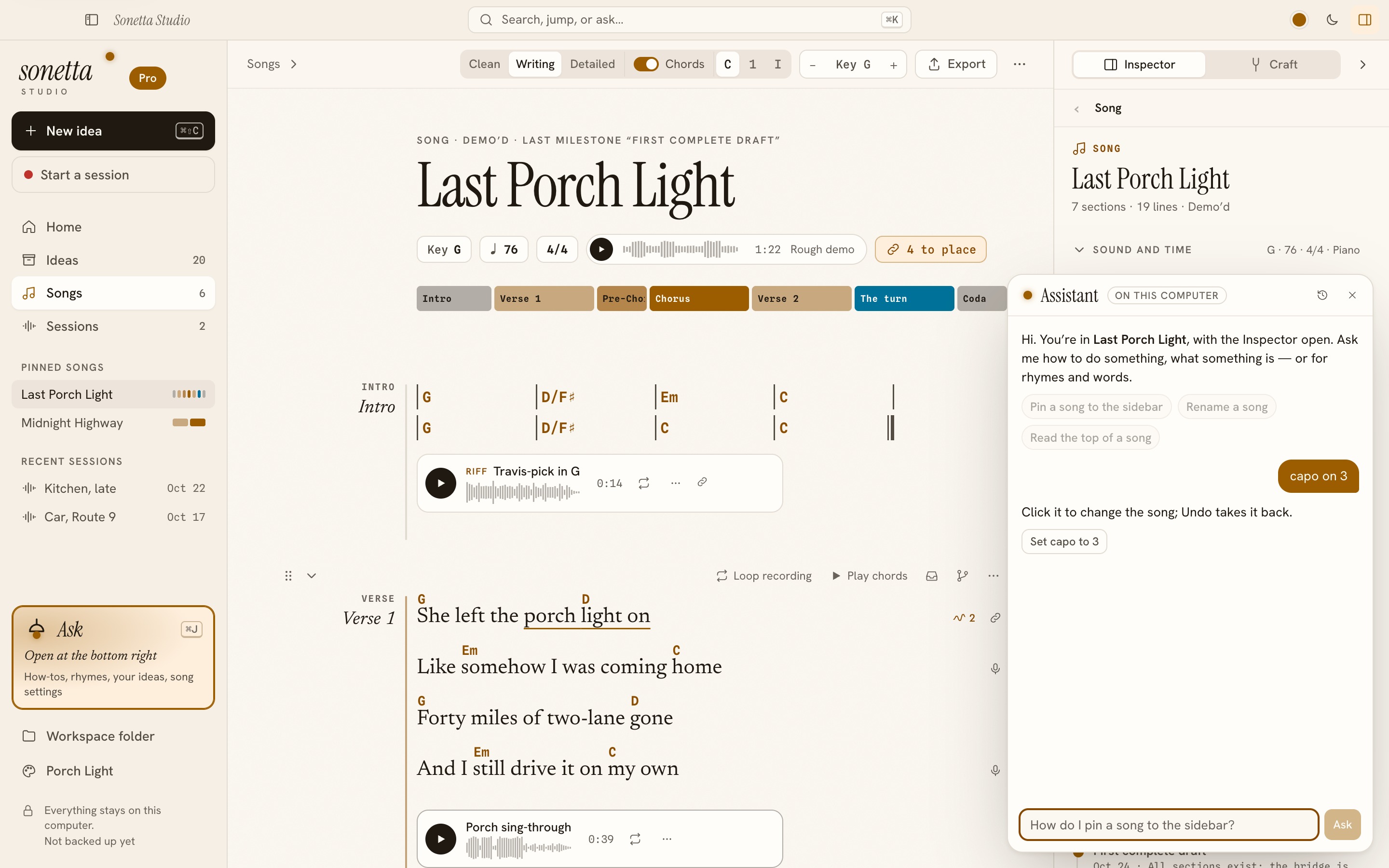
A song open: chords on the words, a take under the verse, and the assistant offering to set the capo.